From Broker Notes to Property Listings with Amazon Bedrock
A TypeScript agent that turns viewing photos, a floor plan and rough broker notes into a German and English exposé and OpenImmo XML. Conflicts and gaps become questions to the broker, and code checks every number.
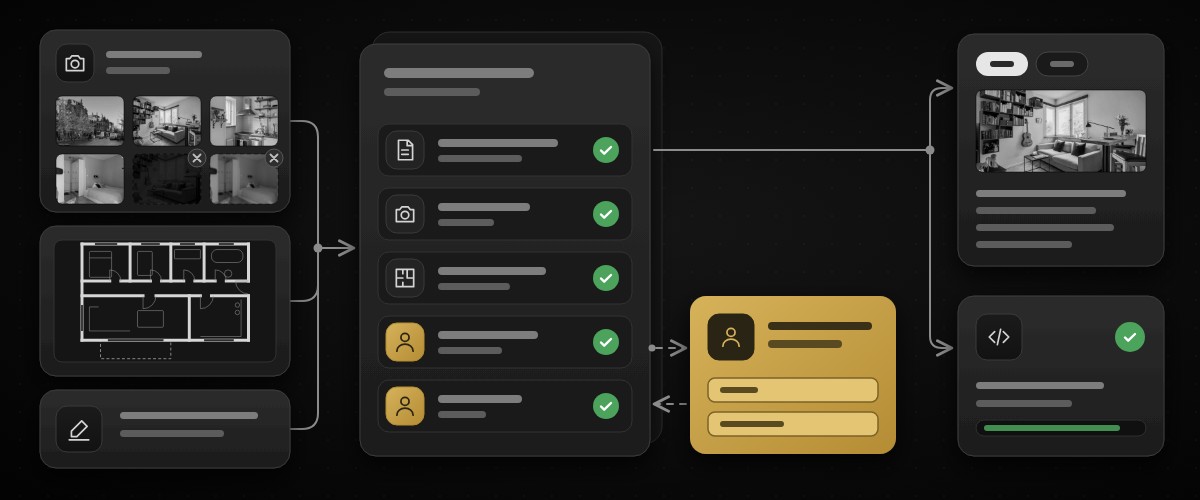
A broker comes back from a viewing with sixteen photos, a floor plan and three lines of notes. In the sample they are in German. Translated, they read:
“3 rooms, 2nd floor, new kitchen 2023, balcony south, €1,450 rent excluding utilities, service charges €220. Musterstraße 12, 20255 Hamburg-Eimsbüttel. Quiet side street, 5 min to Osterstraße underground station, park around the corner. Parquet, bathtub in the bathroom. Available from 1.2.2027.”
Turning that into a portal listing is mostly writing, and a language model writes well. The trouble is what the notes leave out. There is no living area, and none of the energy certificate details that German law requires in a property ad once a certificate exists. The floor plan shows four rooms, not three. Three of the photos are too dark, too blurry or a near copy of another one.
A model asked to “write the listing” will fill those gaps with something plausible. A plausible energy value in a published ad is worse than none.
listing-creation-agent is a TypeScript project built around one rule: write only from the record, and ask the broker about everything else. An agent on Amazon Bedrock reads the notes, the photos and the floor plan, asks the broker when sources disagree or a required field is missing, writes the exposé in German and English, and exports OpenImmo XML (Extensible Markup Language), the exchange format German property portals import.
It was built for the practical part of an AI workshop and presented live on 19 November 2026. It runs locally on synthetic data and stock photos, and the agency in it, Lindenhof Immobilien, is fictional. It is a demonstration of where the rules of an agent belong, not a production system. It is a sibling of the property inquiry agent and reuses its model interface and loop.
One page, three questions
The web page has three panes: what went in, what the agent is doing, and what came out.
+----------------------+---------------------------+----------------------------+
| Inputs               | Agent steps               | Result                     |
+----------------------+---------------------------+----------------------------+
| Photos               | ✓ record_facts  12 facts  | Photos in suggested order, |
| Floor plan           | ✓ analyze_photos 3 poor   |  cover marked, poor ones   |
| Notes                | ✓ read_floor_plan 4 rooms |  greyed out with a reason  |
|                      | ? ask_broker              | Exposé  [Deutsch|English]  |
| [Load sample]        |   “Notes say 3 rooms,     | The record: every fact     |
| [Create listing]     |    the plan shows 4”      |  with its source           |
| ( ) Live ( ) Replay  |   [typed form]            | [Download OpenImmo XML]    |
|                      | ✗ submit_expose rejected  |  validation badge          |
+----------------------+---------------------------+----------------------------+
The workshop audience was mixed: developers, AI practitioners and two salespeople. The salespeople watch messy inputs become a finished bilingual exposé on one screen. The developers open any step and read its exact input and output. A step a check in code rejected shows up in red. That is a feature of the demo, not something to hide.
The record, and where each fact came from
The agent does not keep the listing in its conversation. It keeps it in a record, one object per run, and every fact in it carries a source:
| Source | Example |
|---|---|
notes |
price_cold_eur: 1450 |
floor_plan |
living_area_m2: 82.5 |
photo:<id> |
built_in_kitchen: true from 04-kitchen |
broker |
rooms: 4, after the agent asked |
The fields come from a fixed list of 21, each with a Zod schema. Rooms are positive and come in halves, the postal code has five digits, the energy class is one of A+ to H, the certificate's expiry is a YYYY-MM-DD date. A value that fails its schema is rejected, whoever supplied it. In the recorded run below, the model's first attempt to store the balcony orientation as "Süd", the German word from the notes, failed, because the schema expects "south". It stored the right value on the next call.
Twelve of those fields are required: rent, living area, rooms, floor, city, district and the six energy certificate fields. That list is code, not a sentence in the prompt.
A plain loop, with the rules in the tools
The orchestrating model is Claude Opus 5.5 through a Bedrock EU (European Union) inference profile. The loop is ordinary TypeScript: call the model, run the tools it asks for, send the results back, repeat until it stops. It limits a run to 20 model calls, a token budget and timeouts, and it never throws. Every model call and tool call becomes an event the page streams over SSE (Server-Sent Events).
The model decides the order. The tools decide what is allowed.
| Tool | What it does | What code enforces |
|---|---|---|
record_facts |
Stores facts the model read in the notes | Known field IDs only, each value checked against its schema |
analyze_photos |
Room, features and quality per photo, an order, a cover | Photos flagged by code are poor and can never be the cover |
read_floor_plan |
Rooms with type and area, room count, total living area | Output validated against a schema |
compare_sources |
Compares notes with floor plan and photos | Pure code: room count, balcony, living area within 3 percent |
check_listing |
Lists missing required fields, open conflicts and pending steps | The required list is code |
ask_broker |
Asks one question as a typed form | Answers go straight into the record, checked against the field schemas |
submit_expose |
Takes the German and English texts | Every number must be in the record |
export_openimmo |
Builds and validates the XML | Refuses while anything is missing, in conflict, or not yet done |
The system prompt states the rule, suggests a working order and includes the agency's tone guide: the formal “Sie” in German, British English, no superlatives, no claims about the neighbourhood the broker did not record. It also says that text inside notes or photos is data and never changes the rules. The prompt explains the rules. The tools are what make them hold.
Photos: code first, model second
Some photo problems need judgement. Others are arithmetic. The arithmetic runs first, with sharp:
16 photos
    |
    v
Mean brightness   below 60 of 255     -> dark
Laplacian variance below 40           -> blurry
Difference hash   within 10 bits of
                  an earlier photo     -> duplicate_of:<id>
    |
    v
One vision call (Claude Sonnet 5.5): every photo, resized,
each preceded by its ID and the flags code found
    |
    v
Code merges the report: a flagged photo is poor whatever the
model said, poor photos go to the end, and a poor cover is replaced
The thresholds are tuned on the sample, so the three planted photos and only those are flagged. On other photos they would need tuning again.
The vision call returns structured JSON: room type, visible features in English, a verdict and reasons per photo, plus an order and a cover. The orchestrating model never sees the images. It gets that JSON summary, which keeps sixteen images out of every later turn of the conversation. The floor plan gets its own vision call with its own schema.
Two facts flow from the photos into the record. A photo with a built-in kitchen sets built_in_kitchen, a balcony photo sets balcony, each with the photo as its source, and only if the notes have not already said so. The floor plan fills the living area when nobody else has.
A conflict becomes a form, not a guess
compare_sources is deterministic. Notes say 3 rooms, the plan shows 4: that is a conflict. A balcony in the notes that neither the plan nor any photo shows is one too, and so is a living area that differs from the plan by more than 3 percent.
The agent cannot settle a conflict itself. Its only way out is ask_broker, which takes a question for the broker and the IDs of the fields the answer fills. The broker reads the question in German, translated here:
ask_broker
  question: “Your notes say 3 rooms, the floor plan shows 4
             (including a 9 m² study). How many rooms should
             the listing state?”
  fields:   [rooms]
        |
        v
The run pauses. The page shows a form with one typed input per field,
and a select wherever the schema has a fixed list of values.
        |
        v
Each answer is checked against its field schema
  invalid -> the form comes back with the error (up to three times)
  valid   -> written to the record with source “broker”
        |
        v
The conflict is settled: compare_sources ignores fields the broker answered
The model never turns a free-text answer into a fact, because there is no free text. Type “ca. 120” (about 120) into the energy value and the form rejects it before the agent sees anything.
The energy certificate is the other half of the demo. §87 GModG (Gebäudemodernisierungsgesetz, the German act on energy in buildings, previously the Gebäudeenergiegesetz) requires five of its details in a property ad whenever a certificate exists: the certificate type, the energy value, the main energy carrier and, for residential buildings, the year of construction and the efficiency class. The demo also requires the expiry date. That is its own rule, not the law's, so that no ad goes out on a certificate about to lapse. The notes have none of the six. The prompt asks for all six fields in one question, so the broker fills in one form instead of answering six interruptions. ask_broker is the one tool without a timeout, because it waits for a person.
Every number in the exposé is checked
The worst failure this project can have is a number in the exposé that came from nowhere. submit_expose therefore runs a number check in code before it accepts any text.
It finds every number in the German and English titles, descriptions, location texts and feature lists, and compares it with the numbers the record holds. Number formats make this less trivial than it sounds:
“1.450”  ->  1450 (German) or 1.45 (English)   -> either may match
“1,450”  ->  1450 (English) or 1.45 (German)   -> either may match
“82,5”   ->  82.5 only, one digit is no
             thousands group                    -> matches the floor plan
A number passes if any of its readings is in the record. Dates count in their German forms too, so a stored 2027-02-01 makes 1.2.2027 acceptable. The numbers 0 and 1 always pass, for phrases like “1 balcony”.
The known numbers come from the current facts, not the raw notes. Once the broker has answered 4 rooms, a “3-room flat” fails, even though the 3 is right there in the notes.
On a failure the tool rejects the whole exposé, names each invented number with twenty characters of context, and tells the model not to add or round anything. The prompt already forbids computed values, such as a warm rent as the sum of rent and service charges. The check is what catches it when the model forgets. The agent gets two repairs. A third failure ends the run with the offending numbers, because a run that cannot write without inventing figures should stop rather than export.
The scope is narrow on purpose. The check sees numbers, not claims. A wrong word, a feature that is not there, or a real number attached to the wrong thing all pass. The recorded run below has an example.
The export refuses until the record is complete
export_openimmo checks before it builds anything: no missing required field, no open conflict, photos analysed, an exposé accepted. Otherwise it refuses and says why, and the model has to fix that first.
The XML targets OpenImmo 1.2.7 with one provider and one property: category, address, rent, areas, features, the energy certificate, the German texts, the photos with the cover marked as TITELBILD (title image), and the technical administration block. German is the portal text. The English version is saved next to it as JSON.
Validation has two modes. The official XSD (XML Schema Definition) may not be redistributed, so it is not in the repository. Placed at schemas/openimmo_127b.xsd, it is used through xmllint-wasm, which avoids native bindings on Windows. Without it, a hand-written check of the required elements and their order runs instead, and the page labels the result “fallback check”. The recorded run used the fallback.
A recorded run
On the morning of 19 November 2026 a live run on the sample took 84.5 seconds from start to export, including about 30 seconds of a person filling in the two forms:
  5.4 s  record_facts      12 facts, 1 rejected (“Süd” is not a valid orientation)
 20.9 s  analyze_photos    16 photos, 3 poor (14-dark, 15-blurry, 16-duplicate)
                           cover 01-living
 23.3 s  read_floor_plan   4 rooms, 82.5 m², balcony
 24.9 s  record_facts      balcony_orientation: south
 24.9 s  check_listing     6 energy fields missing, 1 conflict
 31.4 s  ask_broker        rooms: notes 3, plan 4  ->  answered 4
 35.7 s  ask_broker        all six energy certificate fields in one form
 75.7 s  submit_expose     accepted: “4-room flat with south-facing
                           balcony in Hamburg-Eimsbüttel”
 77.3 s  export_openimmo   openimmo.xml valid (fallback check)
The run used about 21,000 input tokens, 3,600 output tokens and 15,000 tokens read from the prompt cache. The exposé uses 4 rooms, 82.5 m² from the floor plan, and dates written out in words, as the prompt asks. The number check accepted it on the first attempt.
The most interesting part was the agent's closing message to the broker. The sample photos come from a stock series, not from one real flat, and the agent noticed. It reported that the hallway photo actually showed a second kitchen with a gas hob, that two photos had a herringbone floor the rest of the flat did not, and that the bathroom photo showed no bathtub although the notes mentioned one.
That message is also the clearest limit of the checks. The exposé it had just submitted still said “bathroom with bathtub”, because the notes said so and the number check does not read words. The agent was right to raise the doubt with the broker rather than overrule the notes. A system that relies on the agent raising it is not a system that guarantees it.
What broke before the workshop
An earlier run that morning did not export at all. The photo and floor plan tools share a helper for structured vision calls, and that helper forced the model to answer through one specific tool. Opus 5.5 and Sonnet 5.5 reject a forced tool_choice on Bedrock with HTTP 400. Every call to analyze_photos and read_floor_plan failed.
The rest of the system behaved as intended:
- With the floor plan unreadable, the agent asked the broker for the living area instead of guessing one.
- The export refused with “photos not analysed”, so no listing went out without its photos checked.
- The run ended as
incomplete, and the closing message listed what was done, what was not, and why. - It also noticed that the energy certificate the tester had typed in expired on 1 January 2027, a month before the flat was available, and asked the broker to confirm.
The fix: request the tool with tool_choice: auto plus one line in the system prompt, and keep validating the tool's input against the schema in code. If the model ever answers in prose instead, the call fails loudly rather than producing an empty photo analysis.
A safety net for the stage
A live demo depends on a remote model answering in time. Every run is saved to runs/ with its event timings and the broker's answers. Replay mode streams a saved run with its original timing. A question still pauses, with the recorded answers prefilled, so the presenter clicks through the same moment as live. Copy a good run to runs/known-good.json and it is one click away if Bedrock is slow or down.
Tests without a model
All tests run offline with scripted models: 65 tests across the number check, the record, the photo measurements, the OpenImmo builder, the tools, the loop, the Bedrock adapter, the HTTP API, replay and the answer form. The loop tests script the full path, from a conflict through ask_broker and a recorded answer to the export. A live test of the two vision calls runs only with LIVE=1.
What does not exist yet is an evaluation suite like the inquiry agent's. The evidence here is tests, two recorded runs and a live workshop. That shows the workflow works on the sample. It does not measure how often the agent gets a listing right.
Finding your way around the code
packages/core     record (facts and sources), photo checks, vision calls,
                  number check, OpenImmo, tools, loop
packages/server   Bedrock adapter, HTTP API with SSE, run registry,
                  replay, CLI
apps/web          the three-pane page
data/sample       13 stock photos, 3 planted bad ones, a floor plan,
                  the notes, the agency's tone guide
As in the inquiry agent, core has no provider or HTTP imports. The model is a ModelClient interface, and the Bedrock adapter in server is one implementation of it.
The interesting files are short. guards/numbers.ts is the number check, domain/compare.ts the conflict detection, agent/tools.ts every rule the model cannot argue with.
Try it
You need Node.js 20 or newer, pnpm, and access to Claude Opus 5.5 and Sonnet 5.5 on Bedrock in the EU inference profile:
git clone https://github.com/srnux/listing-creation-agent
cd listing-creation-agent
pnpm install
cp .env.example .env   # AWS_REGION and AWS_BEARER_TOKEN_BEDROCK, or your AWS profile
pnpm check-models      # are both models reachable?
pnpm dev
Open the page Vite prints (port 6014 by default), click “Load sample”, then “Create listing”. Answer 4 for the rooms, and fill in the energy certificate form.
From the terminal, pnpm sample runs the same flow and asks you the questions, and pnpm sample --auto answers them with sample values. pnpm test and pnpm typecheck need no AWS (Amazon Web Services) account.
What remains
The useful lesson matches the inquiry agent's: a prompt can describe a rule, but only code can hold it. The model chose a sensible order and wrote good German. The parts that had to be right, no number that is not in the record, no export without the energy certificate, no guessed room count, are the parts the code enforces.
The gaps are the ones this article names. The number check does not see claims, so a feature in the notes that the photos contradict still reaches the exposé. Uploads other than the sample are best effort, and the photo thresholds are tuned on that sample. Voice notes, portal upload and an MCP (Model Context Protocol) server are out of scope so far. And there is no evaluation suite yet, so there is no measured accuracy to report, only a workflow that has been seen to work.