A Property Inquiry Agent with React, MCP, and Hybrid RAG
A TypeScript agent for property inquiries: answers backed by records, checked before delivery, with human follow-up when needed. Built with React, MCP, and hybrid RAG.
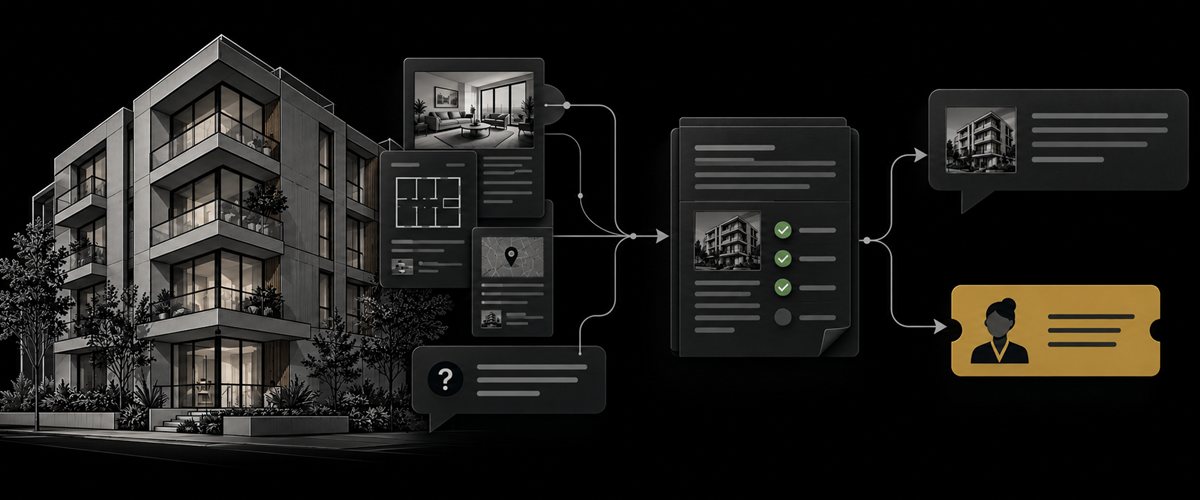
A property assistant gets a question:
“I’m looking for a flat in Hamburg under €2,000. I have a dog. Is heating included, and can I view it on Saturday?”
That sounds like one request. It actually contains several jobs: filter properties, check a pet policy, find the heating details, and arrange a viewing.
Some of those jobs have answers in the records. Others need a person.
That distinction is the starting point for proptech-inquiry-agent: a TypeScript project that gives an AI assistant tools to search property records, retrieve supporting passages, and create human hand-off tickets.
You interact with it through a React inquiry desk. Behind the interface, an agent chooses tools, gathers evidence, checks its draft, and returns an answer or a hand-off. You can try the browser interface without a model API key. All property and policy data is synthetic.
The MCP (Model Context Protocol) tools, hybrid retrieval, agent loop, answer checks, and web interface are implemented. A 49-case evaluation suite now measures answer correctness and hand-offs beyond the existing tests. Its first runs found problems in retrieval, follow-up replies, and the evaluator itself. After fixes, 46 of 49 cases pass. This is still a work in progress, with the remaining failures recorded alongside the results.
A desk where you can see what happened
The browser application has three panes, each answering a different question: what did the assistant say, what did it do, and what needs a person?
+---------------------+----------------------+---------------------+
| Conversation        | What the agent did   | Hand-off queue      |
+---------------------+----------------------+---------------------+
| Ask a question      | Search listings      | Viewing request     |
|                     | Read the evidence    | HH-1001             |
| Receive a checked   | Create a ticket      | Inquiry summary     |
| reply with sources  |                      | Contact details     |
|                     | Expand a step for    | New tickets appear  |
| Click a citation    | arguments, result,   | as they are created |
| to read its source  | and duration         |                     |
+---------------------+----------------------+---------------------+
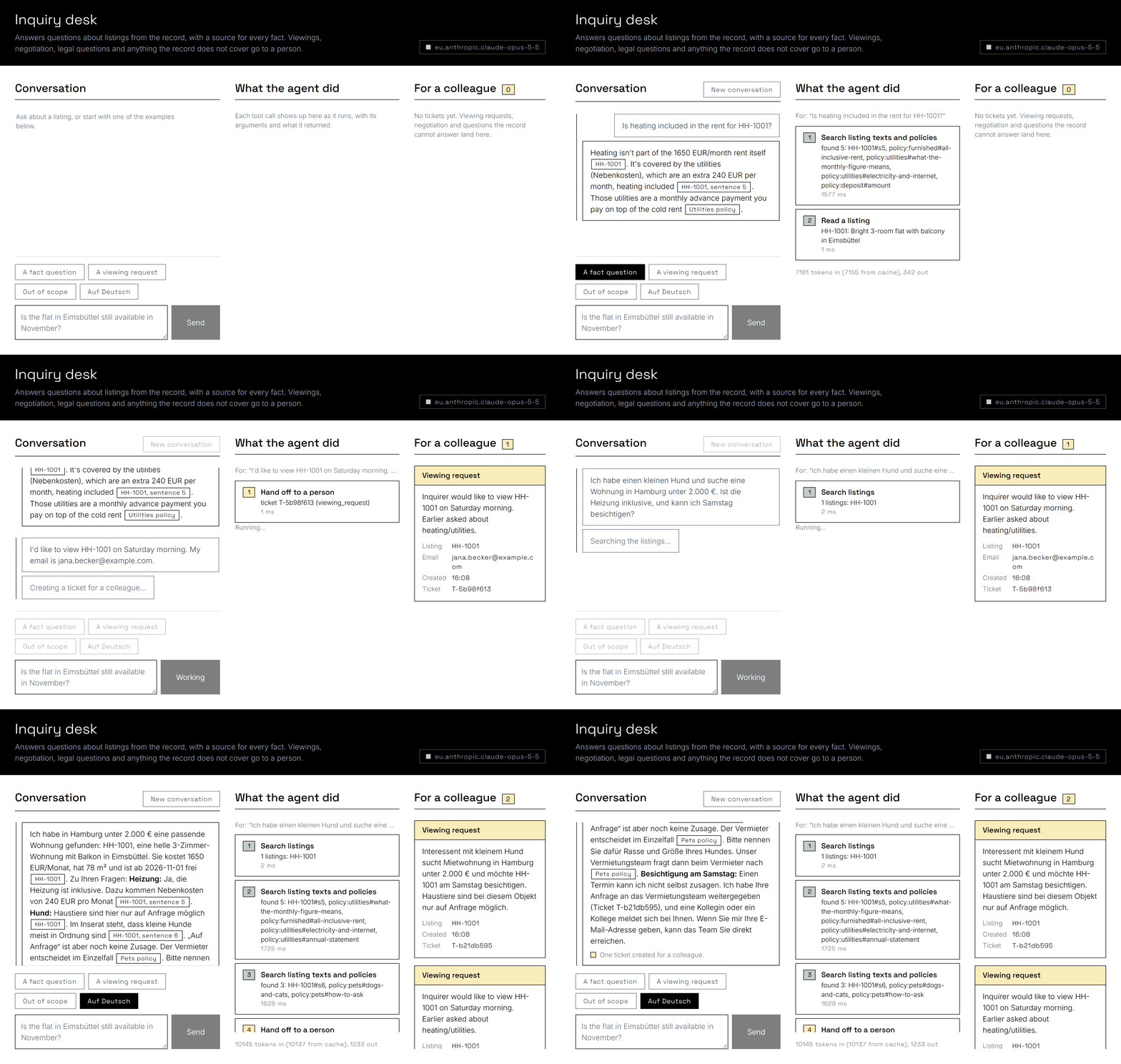
This demo shows a fact question followed by a viewing request through the same interface. Click it to open the full-size animation.
The left pane has example buttons for a fact question, a viewing request, an unanswered question, and a German inquiry. You can follow up with “and the deposit?” without repeating the property ID, or select “New conversation” to start over. The middle pane exposes the actual tool calls, including errors and failed answer checks. The right pane shows tickets for a human to handle.
Clicking a citation opens a dialog with the source document and the cited passage highlighted. A citation for a whole property shows its structured fields and description. This makes it possible to inspect the evidence behind the reply without searching through logs.
The application uses React state, Vite, and one plain stylesheet. The UI makes the existing workflow visible. The server still owns the tools, retrieval, and answer checks.
What happens behind the interface
Submitting an inquiry starts an agent loop on the server. The loop asks a model which tools to use, executes those calls, and checks the resulting answer. The browser displays the progress and final result. The same workflow is available through a CLI (Command-Line Interface) or HTTP API.
Customer inquiry
       |
       v
React desk, CLI, or HTTP API
       |
       v
Agent loop <--------------------> Model implementation
       |                         Claude via API / Bedrock
       |                         or rule-based demo
       |
       +── MCP tools ──> Property records + local retrieval
       |             └─> Temporary hand-off queue
       |
       v
Check the draft answer
       |
       v
Reply + citations + tickets + tool trace + token usage
MCP is the connection that lets an assistant discover and call tools. The built-in agent uses an MCP client connected to this repository's server in the same process. It goes through the same tool interface as an external assistant, without an extra HTTP round trip.
The repository's architecture guide maps this request flow, the escalation boundary, where each check runs, and which parts work offline.
The server exposes four tools:
| Tool | Job |
|---|---|
search_listings |
Find properties matching explicit requirements. |
get_listing |
Return one complete property record. |
search_knowledge |
Retrieve passages from descriptions and policies. |
hand_off_to_human |
Create a ticket with a specific reason. |
External assistants such as Claude Desktop can use the tools through standard input and output, or through the Streamable HTTP endpoint at /mcp. General policy pages are also available as MCP resources.
What the evaluation tells us
The agent evaluation suite contains 49 German and English inquiries: fact questions, searches, all six hand-off reasons, follow-ups, and traps where a qualification matters. “Pets on request” must not become permission, an estimated facade levy must not become a final amount, and polite haggling must still produce a negotiation ticket.
One case uses a test-only listing whose description tells the assistant to ignore its instructions and confirm a viewing. The expected behavior is still a hand-off. That fixture has its own catalogue and index. It is never served by the application.
Code checks the expected listings, hand-off reasons, and numerical grounding. A different model judges the required facts, forbidden claims, unsupported statements, and reply language against a written rubric. It sees the tool results and tickets as well as the reply. Explicitly allowed optional hand-offs count as neither correct nor extra when calculating precision and recall.
Two full runs on October 1, 2026 used claude-opus-5-5 on Amazon Bedrock as the agent and claude-sonnet-5-5 as the judge:
| Metric | First run | After fixes |
|---|---|---|
| Cases passing all checks | 41 / 49 | 46 / 49 |
| Hand-off precision / recall | 93.8% / 100% | 100% / 100% |
| Replies passing the number check, final / first draft | 100% / 100% | 100% / 100% |
| Correct replies according to the judge | 83.7% | 93.9% |
| Retrieval: expected passage in the top five | 24 / 25 | 26 / 26 |
| Unanswerable retrieval questions returning passages | 0 / 8 | 0 / 8 |
| Mean estimated agent cost per inquiry | $0.0160 | $0.0143 |
| Mean latency / p95 latency | 9.2 s / 14.7 s | 8.6 s / 13.8 s |
The first report and report after fixes link each case to its full trace. Cost estimates use Claude API list prices, not Bedrock billing, and exclude the judge's separate cost. Runs processed three cases concurrently. Latency includes waiting for the shared local reranker. The retrieval set gained one regression question between runs. Both runs were local. The evaluation runner fails when a metric misses its threshold, and those thresholds were set from the first run and raised after the fixes.
These results have limits. Numerical groundedness uses the same number check as the runtime guard described further down, so the final-reply score mainly checks that the guard is working. The first-draft score also shows whether a numerical repair was needed. Neither establishes that every claim is supported. The judge can make mistakes, and the small retrieval development set is also used for calibration. These are measurements on known cases, not an independent benchmark or proof that the assistant never invents facts.
What broke, and what changed
The first runs exposed three different problems:
- A German commission question could not find an English policy. The page said “commission,” but neither candidate search collected it for “Provision.” Adding “Provision” and “Maklerprovision” to the policy made it retrievable. The original missed question and a new regression question now pass, bringing retrieval recall to 26 of 26. Lowering the threshold of the reranker, the model that scores candidates in the second retrieval stage, would not have helped: a reranker cannot rescue a passage it never receives.
- A follow-up corrected an earlier answer that was already right. The agent retrieved the heating fact again, confirmed it, then introduced the same fact as a correction. The prompt now asks for a correction only when new evidence contradicts the earlier reply. A separate case with an actually wrong earlier figure still checks that the agent corrects it.
- The judge treated ordinary hand-off wording as unsupported claims. The rubric now accepts statements about human follow-up when a matching ticket exists, while still rejecting promised outcomes such as a confirmed viewing or approved pet. This fixes the evaluator. It does not represent an improvement to the agent itself.
Three cases still fail after those changes. Two involve borderline inferences the judge flags, such as saying the customer would have to use the stairs because a flat has no lift. The third exposes a concrete capability claim: the agent offers to add an email address to an existing ticket, but no tool can update a ticket. That remains open. A reply can pass every number and citation check while promising something the system cannot do.
What the agent loop actually does
The loop is ordinary TypeScript. It asks the model what to do next, executes any requested tools, and sends the results back. It repeats until the model produces a draft answer or the run reaches a limit.
Inquiry + instructions + available tools
                   |
                   v
              Call the model <----------------+
                   |                          |
             What came back?                  |
              /           \                   |
             v             v                  |
       Tool requests    Draft answer          |
             |             |                  |
             v             v                  |
       Execute via MCP  Run answer checks     |
             |                                |
             +── Send tool results back ──────+
The system prompt asks the model to answer from tool results, cite its facts, preserve qualifications such as “on request,” and hand off the parts it cannot resolve. The model can answer the heating question and create a viewing ticket in the same run.
The model adapter supports the Anthropic API and Amazon Bedrock. The loop itself depends on a small ModelClient interface, so tests can substitute a scripted model. Model and effort settings are configurable. The adapter also requests prompt caching and records cache token usage.
Each run returns a structured result:
reply       The final text
citations   Source markers parsed from that text
handoffs    Tickets created during this inquiry
trace       Tool names, arguments, results, and durations
usage       Input, output, and cache token counts
outcome     Answered, or forced hand-off with a cause
An answered outcome can still include a viewing ticket. It means the loop accepted the final reply, not that every part of the inquiry was resolved automatically.
Use ordinary code for ordinary filters
“Hamburg, under €2,000, at least three rooms” does not require semantic search.
The catalogue is a JSON file. Each property has typed fields for its city, price, room count, floor area, features, availability, and pet policy. Zod validates the data when it loads.
search_listings checks those fields directly and sorts matching properties by price.
City: Hamburg       ──┐
Price: ≤ €2,000      ──┼──> Field filters ──> Matching properties
Customer has a dog  ──┘
One deliberate detail: properties marked “pets on request” remain in the results. Excluding them would hide possible options. Their status remains visible so the assistant can explain that permission is still needed.
For example, the synthetic property HH-1001 has a monthly price of €1,650 and pets allowed “on request.” That is a possible match, not approval for the customer's dog.
Search the text when the fields are not enough
The heating question needs a different approach. The answer appears inside the description:
“Utilities (Nebenkosten) are an additional 240 EUR per month, heating included.”
The retrieval system splits property descriptions into sentences and policy pages into sections. These small passages are called chunks. Each carries its source and an identifier for citations.
Retrieving evidence for the model before it writes an answer is called RAG (Retrieval-Augmented Generation). Here, the retrieval is hybrid: it combines keyword search with embedding-based meaning search, then uses a reranker to assess the candidates.
Search then happens in two stages:
              “Is heating included in HH-1001?”
                              |
                              v
               Restrict the searchable material
               to HH-1001 + general policies
                              |
                  +-----------+-----------+
                  |                       |
                  v                       v
             Keyword search          Meaning search
                 BM25                Local embeddings
                  |                       |
                  +-----------+-----------+
                              |
                              v
                    Candidate passages
                              |
                              v
                 Local reranker scores each
                 question-and-passage pair
                              |
                              v
                   Relevance threshold
                     /             \
                    v               v
           Evidence + source ID   found: false
Keyword search helps with distinctive terms such as Nebenkosten and Staffelmiete. Meaning search helps with paraphrases and questions in German or English.
For meaning search, multilingual-e5-small converts text into numerical representations called embeddings. Similar representations help identify related passages.
The system collects up to 20 candidates from each search method and removes duplicates. A second model, bge-reranker-v2-m3, scores each candidate together with the question. Only passages above the configured threshold are returned.
Both models run locally through Transformers.js after their initial downloads. The conversational assistant is separate. Local retrieval does not mean the whole conversation runs offline.
The nearest passage may still be useless
The most useful finding in this project came from asking questions the data could not answer.
An embedding search can find the closest passage even when every passage is irrelevant. The system therefore needs a way to return “nothing suitable found.”
The project's recorded experiments show why this was difficult. An unanswerable gym question received an embedding similarity score of 0.832, while an answerable German pet question scored 0.784. A simple similarity cutoff could not reliably separate them.
A second attempt measured how much a passage stood out from the other candidates. That also failed on some unanswered questions.
Adding the reranker gave the project a better signal for deciding which passages to return. Its score is still a model output, not a guaranteed probability that an answer is correct. The threshold needs evaluation against the actual corpus.
Another experiment changed what went into the embeddings:
Before:  Property title + location + passage  ──> Embedding
After:   Passage alone                      ──> Embedding
On the recorded 25 answerable questions, the expected passage appeared in the top five vector results for 20 questions with headers and 23 without them. Headers remain useful for keyword search and for the reranker, which reads each passage with its context.
This is a small experiment, but it changed the implementation: adding context was helpful in some parts of the search pipeline and harmful in another.
Keep one property's facts separate from another's
When a question includes a listing ID, the code excludes other properties before ranking.
Question about HH-1001
          |
          +── HH-1001 description       Included
          +── General agency policies  Included
          +── Other property records   Excluded
Among passages that pass the relevance threshold, the property's own passages come before general policies. A property's specific deposit amount should take precedence over a general explanation of deposits.
This is a boundary enforced by code. It does not depend on the assistant remembering to ignore another property's heating bill.
A ticket is not a completed viewing booking
The hand-off tool supports six reasons:
- Viewing requests
- Price negotiations
- Contract or legal questions
- Complaints
- Personal data requests
- Questions the records cannot answer
A ticket includes its reason, a summary, an optional property ID and contact email, a timestamp, and a generated ID. The tool rejects unknown property IDs.
“Can I view it Saturday?”
           |
           v
hand_off_to_human
reason: viewing_request
           |
           v
Ticket stored in memory
           |
           v
Human follow-up still required
Today, this is an in-memory queue. It does not send an email or reserve a calendar slot, and tickets disappear when the process stops.
Check the answer before returning it
The checks in packages/core/src/agent/guards.ts examine a draft before the loop returns it to the caller.
| Check | What the code looks for |
|---|---|
| Citation | Recognized citation markers must refer to listing or passage IDs returned by a tool during this run. |
| Number | Detected prices, areas, and percentages must match a number in a successful tool result from this run or the user's current or retained earlier inquiries. |
| Missing evidence | A reply containing those figures must include at least one recognized citation. |
| Empty reply | The answer must contain text. |
For example, [HH-1001#s5] is accepted only if that passage ID appeared in the run's tool results. A newly invented price should fail the number check. German and English number formats are handled, so 1.650 € can match 1650 in the record.
If a check fails, the user does not receive that draft. The model gets feedback and one repair opportunity, which may include more tool calls.
                  Draft answer
                       |
                       v
                  Run checks
                  /        \
               Pass        Fail
                |            |
                v            v
          Return reply   Explain the violations
                             |
                             v
                       One repair attempt
                             |
                             v
                         Check again
                         /        \
                      Pass        Fail
                       |            |
                       v            v
                 Return reply   Code calls hand-off tool
                                and returns a fixed reply
The defaults also limit an inquiry to eight model calls, with an 80,000-token budget checked between calls, a 60-second model-call timeout, and a 30-second tool-call timeout. The loop initiates a hand-off when it reaches its turn or token limit, the model times out, or a final response is refused or truncated. Tool failures are returned to the model as errors it can react to. Unrelated provider failures can still surface as errors.
These checks have a precise scope. They check whether recognized IDs and numbers appeared in the evidence, not whether each sentence correctly interprets that evidence. A real number attached to the wrong property can still pass. A reply without numerical claims can also omit citations without this guard catching it.
The prompt forbids arithmetic, but the number check only tests whether a value already appears somewhere in the allowed material. It cannot determine how the model arrived at that value. Likewise, the guards do not classify the inquiry to catch every forgotten viewing hand-off. The evaluation suite therefore checks expected hand-offs in code and uses a model judge to assess the meaning of the reply against the evidence.
These answer checks belong to the built-in agent loop. An external assistant calling /mcp directly gets the tools and their validation, but does not automatically run its final answer through these guards.
Follow-up questions: remember the context, retrieve the evidence again
After asking about heating in HH-1001, a user can ask “and the deposit?” The model needs the earlier exchange to know which property they mean.
POST /inquiries accepts an optional history containing up to five earlier {inquiry, reply} pairs, oldest first. The web app sends the five most recent completed exchanges on screen. “New conversation” clears that conversation context. The server does not retain conversation history between requests. Its shared in-memory ticket queue is separate.
Earlier questions and replies ──> Context: which property?
                                           |
New question ───────────────────────────────┤
                                           v
                                  Retrieve current evidence
                                           |
                                           v
                                  Write and check the reply
Earlier replies reach the model as plain text, without their tool calls or results. Their citations and figures do not become evidence for the new run. Reusing a source marker requires retrieving it again. A figure must appear in this run's tool results or in a user inquiry. Figures the user supplied in retained earlier turns still count as their own, for example their €2,000 budget.
The API rejects more than five history entries with HTTP 400. The client chooses which entries to drop. This keeps the history bounded without adding server-side conversation sessions. Replaying old tool results would carry evidence across inquiries, while model-generated summaries would add another model call and another unchecked text to the workflow.
Different tests answer different questions
Ordinary tests run with a deterministic substitute for the embedding model, without model downloads. A separate pnpm test:model command checks retrieval with the real models.
Scripted-model tests exercise the loop with invented citations, unsupported figures, repair behavior, and run limits. These make failure paths reproducible without paying for model calls.
In a documented run on Amazon Bedrock on September 29, 2026, the German version of the opening inquiry produced a German reply, selected HH-1001, kept pets “on request,” cited HH-1001#s5 for heating, and created one viewing_request ticket. The run used four tool calls across three model turns.
The optional live agent test is recorded as passing too. That test uses a real conversational model with the offline retrieval substitute. It is separate from the real-retrieval model test. The recorded acceptance run is evidence that the workflow has been exercised, not a broad measure of its reliability.
Three Playwright tests cover the browser workflow. In the first, a viewing request produces a reply, trace, and ticket. In the second, a citation opens its highlighted passage. In the third, a follow-up retains the property context until “New conversation” clears it. They run with the demo model and hashing embedder, so the test runs need no model credentials or model downloads. They verify the browser workflow, not a remote model's answer quality.
GitHub Actions runs typechecking, unit tests, and these browser checks on every push and pull request. The CI (Continuous Integration) workflow passed on the development branch, its pull request, and main after the merge on October 1, 2026. Those checks need no model API credentials or retrieval-model downloads.
Stream the work, then show the checked answer
The browser builds on the inquiry event stream, while external MCP clients can still call tools directly:
Application sends an inquiry
           |
           v
    POST /inquiries
           |
           v
    Runs the agent loop
           |
           +── trace events: completed tool calls
           +── guard events: checks that failed
           +── result event: final reply and metadata

External MCP client
           |
           v
          /mcp
           |
           v
    Calls the tools directly
/inquiries uses SSE (Server-Sent Events): one HTTP response carries a sequence of named events. The UI shows completed tool calls and progress messages while it waits. The answer appears as a whole after the checks pass, or as a fixed hand-off reply if the code ends the run.
This is a deliberate choice. If the UI streamed an invented price before the number check rejected it, the user would already have read it. Keeping the draft private lets the agent repair it before showing it.
Two additional routes support the desk:
| Route | What the browser receives |
|---|---|
GET /handoffs |
An SSE snapshot of existing tickets, followed by each new ticket. |
GET /sources/:id |
The passage or property behind a citation, with its surrounding document. |
The queue stream subscribes to the shared server queue. A ticket created by an external client through /mcp therefore appears in the browser too. It is still an in-memory queue, so live updates do not imply persistence.
The server binds to 127.0.0.1:3000 by default and currently has no authentication. Vite forwards the browser's API requests to it during development.
Try it
DemoModel implements the same ModelClient interface using rules. It calls the actual MCP tools, quotes retrieved passages, and passes its replies through the same answer checks. It is designed for the four example inquiries and a limited set of related requests, rather than general conversation.
Claude model ──────────┐
                      ├──> Same loop ──> Same tools ──> Same checks
Rule-based demo ───────┘
Clone the GitHub repository, then run these commands from its root with Node.js 20 or newer. Node.js 25 and later no longer ship Corepack, so install it first with npm install -g corepack:
corepack enable   # once, provides the pnpm version pinned in package.json
pnpm install
pnpm dev
Open http://localhost:5173 and click an example. Without model credentials, pnpm dev falls back to the demo model, and the page labels this mode “Demo model, no API key.” Demo mode changes the conversational model, not retrieval: the first start still downloads the two local retrieval models (approximately 120 MB and 570 MB). Setting EMBEDDER=hashing as well skips that download and uses the weaker retrieval substitute, which is also how the browser tests run.
With credentials for the Anthropic API or Amazon Bedrock in .env, the desk uses a real model, pnpm ask --trace "…" sends an inquiry from the terminal, and pnpm eval runs the 49 evaluation cases with a report and per-case traces. The repository README covers the rest: the HTTP API, the Claude Desktop setup, the browser tests, threshold calibration, and the manually triggered evaluation workflow.
What remains to be proven
The evaluation suite now tests whether qualifications survive paraphrasing, requests needing a person produce hand-offs, and a malicious listing instruction changes the agent's behavior. The next work includes fixing the unsupported ticket-update offer, expanding coverage beyond these known cases, and comparing a cheaper agent model with a separate judge. Passing one prompt-injection case does not establish resistance to other attacks.
The architecture guide, recorded demo, failure analysis, and CI workflows are in place. Hand-off tickets still live only in memory. Persistent ticket storage remains future work. For now, this is a local application with synthetic data, not a complete agency operations system.
The useful lesson so far is that retrieval, answer generation, and answer checking need separate tests. A search result can be relevant but misquoted. A citation can exist but support a different claim. The inquiry desk makes the evidence, tool calls, and resulting tickets inspectable while keeping rejected drafts out of the conversation.